Monday, 26 May 2014

Ufone 3G Packages For Prepaid Customers

Do you want to know the current  Ufone 3G Packages For Prepaid Customers? if your answer is YES, then you are at the right place, because through this informative article you will be able to know the Current and latest Packages of ufone Prepaid 3G. With the help of this article you will get Complete information regarding the current packages of Ufone Prepaid 3G. Now the only thing you have to do is visit frequently in this Website for the current and up-to-date information of Ufone 3G Prepaid Packages. Below you can find the complete list of Ufone 3G Prepaid Packages.

256 KB/S Subscription Charges Validity Volume Check Remaining Volume
Half Day *810# 5 Rupees Half Day (20 Hrs) 50 MB *706#
Daily *804# 10 Rupees 1 Day 40 MB *706#
Weekly *7811# 50 Rupees 1 Week 250 MB *706#
Monthly *7807# 200 Rupees 1 Month 1 GB *706#
Monthly *5506# 250 Rupees 1 Month 1.5 GB *706#
Monthly *803# 500 Rupees 1 Month 3 GB *706#


512 KB/SSubscriptionChargesValidityVolumeCheck Remaining Volume
Weekly*7814#75 Rupees1 Week250 MB*706#
Monthly*7809#400 Rupees1 Month1 GB*706#
Monthly*5507#550 Rupees1 Month1.5 GB*706#
Monthly*8031#800 Rupees1 Month3 GB*706#


1 MB/SSubscriptionChargesValidityVolumeCheck Remaining Volume
Weekly*7815#125 Rupees1 Week250 MB*706#
Monthly*7810#550 Rupees1 Month1 GB*706#
Monthly*5508#675 Rupees1 Month1.5 GB*706#
Monthly*8032#1250 Rupees1 Month3 GB*706#


3 MB/SSubscriptionChargesValidityVolumeCheck Remaining Volume
Monthly*813#725 Rupees1 Month1 GB*706#
Monthly*814#900 Rupees1 Month1.5 GB*706#
Monthly*815#1500 Rupees1 Month3 GB*706#


There are certain things that you have keep in your mind, like in the charges of packages taxes are not included, so before subscribing any package first verify that you have sufficient amount of balance in your Ufone Prepaid Sim to cover all the taxes that is included that package. If you want to know more about the Tax structure then you have visit the official website of Ufone. 

(Date of update =26/05/2014)

Sunday, 6 April 2014

ARY Zindagi - A New Pakistani Satellite TV Channel

Congratulations, ARY Digital Network launched a new drama channel, A big advantage of this channel is that through this channel you can watch Pakistani as well as Indian Drama Serials Like Adaalat , a very famous Indian Drama. So overall we can say this is a very good step taken by the ARY Digital Network to come up with a channel that fully entertain you. Currently this channel is on "TEST RUN" and at this time you can watch this channel on "AsiaSat 3S 105.5 Degree East"

ARY Zindagi A New Pakistani Satellite TV Channel Currently On TEST RUN
ARY Zindagi Currently On TEST RUN
You can watch this channel with the help of Following Information.

Satellite: AsiaSat 3S 105.5 Degree East


Frequency/Symbol Rate: 4060/V/26666


Sunday, 2 March 2014

PTV SPORTS BISS KEY

PTV Sports is the leading and one of the best Pakistani Sports Channel, Currently you can watch this channel on Paksat 38 Degree East, but the problem is that PTV Sports is not a FTA (Free To Air) TV Channel, So to watch this amazing sports channel you need to enter BISS Key in your digital receiver, and this article provides you the correct and updated BISS Key Of PTV SPORTS, because PTV Sports BISS KEY is Changing continuously. So if you want correct and updated BISS key of PTV Sports you need to visit this Page regularly. Below you can find the Verified BISS Key of PTV SPORTS.


Satellite = PakSat 1r 38 @ Degree East


Frequency/Symbol Rate = 4004/V/15555


BISS KEY = 51 32 13 CC 9A DD EC CC 

Verified Working BISS key of Ptv Sports PakSat
Working Biss Key Of PTV SPORTS

(Date and time of updated Key =11/09/2016. 04:00 PM PST)


Sunday, 24 November 2013

How To Disable Pop-Up Blocker In Google Chrome

Do you want to know that how to Disable Pop-Up Blocker in Google Chrome? If yes then you are at the right place, because through this article you will be able to know how to Disable or enable Pop-Up Blocker in Google Chrome, It is quite simple and easy, but the only thing you have to do is to pay attention while reading my article.

You have Follow Five Simple Steps to Disable Pop-Up Blocker in Google Chrome,

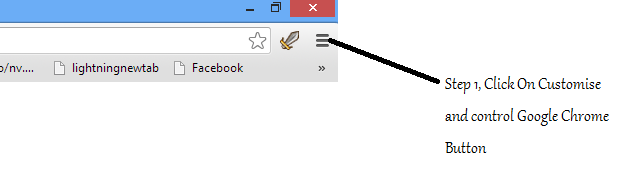
Step 1:- First of all you have open/start your browser (Google Chrome), and click on "CUSTOMISE AND CONTROL GOOGLE CHROME" Button/Icon, which is on the top right side of your Google chrome browser.

Step 1, Click On Customise and Control Google Chrome Button


Step 2:- In this step, You just have to click on Settings Button.
Step 2, Click On Settings Button


Step 3:- In Step 3 you will see a new page in your Google Chrome Screen, The only thing you have to do in this Step is just to Scroll down Page, and Click On "Advanced Settings" Button.
Step 3, Scroll Down Page, and click On Show Advanced Settings button
Step 3, Scroll down page, and click on Show Advanced Settings Button

Step 4:- After Step 3, Advanced Settings related to your Google Chrome Broswer will be vissible on your screen, and you have to click on "Content Settings" Button, You can find Content Settings Button in the Category Of Privacy.
Step 4, Click On Content Settings Buttons
Step 4, Click On Content Settings Button

Step 5:- This is the final Step of How To Disable Pop-Up Blocker In Google Chrome , and in this step you have to scroll down the page and and Sellect the option of "Allow all Sites", and click on Done Button.
Step 5, Click on Show Pop-ups Option, and Click On Done Button To Save Settings
Step 5, Click On Show Pop-ups option, and click on Done Button To Save Settings.

Congratulation, you have learned how to Disable Pop-Up Blocker In Google Chrome, and through this way you can enable/disable the pop-up blocker in Google Chrome.

Saturday, 16 November 2013

Online Vehicle Verification For Sindh

Good news for four wheelers and two wheelers, if you are from sindh and wants to verify/confirm your vehicle ownership, Engine No, Horse Power, Remarks,  now you can verify/confirm all of these things at your home free without going at any government office. Yeah it is true now you can check/Verify your vehicle registration without going anywhere, and for that the only thing you have to do is just to visit the portal/website of Excise and Taxation Department Sindh and enter your vehicle registration number.

Excise and Taxation Department, Sindh Government, Introduced online portal through which anybody can verify their four/two wheel vehicles registration. From this portal they can check following things about their motor vehicle.

1. Registration No.
2. Make 
3. Registration Date
4. Body Type
5. Tax Payment
6. Model Year
7. Engine No
8. Safe Custody
9. vehicle Owner Name
10. CPLC
11. Seating Capacity
12. Horse Power
13. Remarks

Here the main Question is How to check Vehicle Registration, and all of above important things about vehicle online? The answer is quite simple and easy, you have to follow these simple and easy steps, and after these steps you will able to check/varify you Vehicle Registation Online Free.

Step 1.
Go to the Portal/Website of Excise and Taxation Department Sindh, URL of this portal/website is http://www.excise.gos.pk/.
URL OF Excise and Taxation Department, Sindh
URL OF Excise and Taxation Department, Sindh 

Step2.
In Step 2, Click on Online vehicle verification link, you can find this link on the left side of the portal/website.
Click On Online Vehicle Varification Link
Click On Online Vehicle Varification

Step3.
In Step 3, you have to select your vehicle (e.g. Four wheelers, Two wheelers), if you have motor bike select Two Wheelers, and if you have Car then Select Four Wheelers. After selecting your vehicle, you have to enter your car registration number (E.g. AAA-123).  After this enter the security code and click on send button.

Form Of Online Vehicle Varification Sindh, 1.Select Vehicle, 2.Enter Registration, 3.Enter Security Code, 3.Click On Send Button
Form On Online Vehicle Verification Sindh

After Completing these steps successfully, a new window will be open and from that window all the important information regarding to the vehicle will be visible on your browser.